Best apps to remove background noise on iPhone (2026)
For a quick fix, try Voice Memos’ built-in Enhance Recording first: it’s free and one tap. For a recording that still isn’t clear, Denoise and ARP both clean speech on the iPhone without uploading it. Adobe Podcast gives a studio-style voice, but you upload the file to Adobe.
ARP is our app, so read its section with that in mind. Every fact about the other apps comes from their own App Store listing or website, checked on 31 October 2026. Prices change, so check the App Store for the current one in your country.
How we picked
- It works on an iPhone, on a recording you already have.
- It’s built for speech: voice memos, interviews, lectures, meetings.
- It says plainly whether your audio is uploaded.
- You can try it free before paying anything.
At a glance
| App | Where it runs | Free | Paid | Best for |
|---|---|---|---|---|
| Voice Memos | On the iPhone (built in) | All of it | — | A quick one-tap fix |
| Denoise | On the iPhone or iPad | The AI denoiser | Denoise Pro: monthly or lifetime | Video, and cleaning while you record |
| ARP (ours) | On the iPhone, iPad or Mac | 10 recordings | Premium: one-time purchase | Checking what was removed; before-and-after transcripts |
| Adobe Podcast | In the browser; files are uploaded | With a free Adobe account | Firefly Pro plan | A studio-style podcast voice |
1. Voice Memos: Enhance Recording
If the recording is already in Voice Memos, start here. Apple describes Enhance Recording as reducing “background noise and room reverberation with a single tap”, and it costs nothing. Open the memo, turn on Enhance Recording, and listen. Voice Memos can also make a transcript of the recording.
Good for: everyday memos with steady background noise, already in Voice Memos. Less good for: judging exactly what the cleanup changed. It’s a single switch, with no way to play back what was taken out.
2. Denoise: AI Noise Remover
Denoise is an on-device app for iPhone and iPad. Its listing says no audio leaves the device, and its core AI denoiser is free. It also works on video, from the share sheet and from Photos. On iOS 18 and later it can clean the noise while you record. Denoise Pro, a monthly subscription or a one-time lifetime purchase, adds unlimited saving and exporting and a stronger “Pro Rescue” mode for damaged audio.
Good for: people who also clean video, or want a recorder that cleans as it goes. Worth knowing: exports are M4A or MP3.
3. ARP: Audio Revival Processor (our app)
ARP cleans speech on your iPhone, iPad or Mac, and your recording never leaves the device. What it adds is a way to check the result. Switch between Original, Cleaned and Removed, which plays back only what the cleanup took out: if you can follow words in Removed, it took too much. It can also transcribe both versions on the device, so you can read the difference and export the text or subtitles (TXT or SRT).
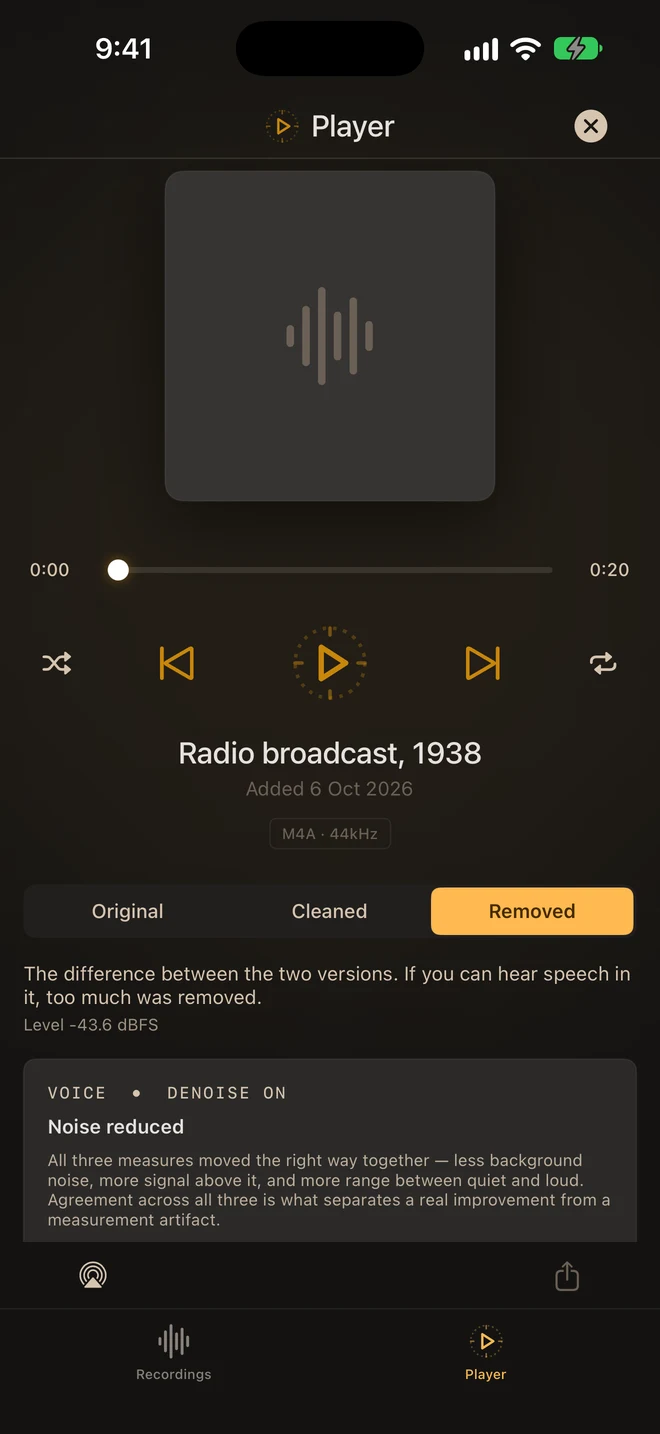
ARP measures the background first. If a recording is already clean, it says so, changes nothing, and that recording doesn’t count against your 10 free recordings. Recordings can be up to 3 hours. M4A export is free. Premium is a single purchase, not a subscription: no limit on recordings, plus 24-bit WAV and AIFF export.
Good for: interviews, lectures and anything you need to quote, where you want to hear and read what changed. Less good for: video, and it doesn’t open Voice Memos directly. Save the memo to Files first (steps here).
4. Adobe Podcast: Enhance Speech
Adobe’s Enhance Speech runs in a web browser. You sign up for a free Adobe account and upload the file. Adobe says the result sounds as if it were recorded in a professional podcasting studio. The paid Firefly Pro plan raises the limits to 4 hours a day and files up to 2 hours and 1 GB, and adds an adjustable strength control.
Good for: podcasts and voiceovers, when uploading is fine. Not for: anything confidential you’d rather keep off someone else’s servers. See on-device vs cloud cleanup.
Which one should you use?
- It’s a voice memo and you need it clearer now: Voice Memos’ Enhance Recording.
- It’s a video, or you want to clean while recording: Denoise.
- You need to be sure no words were lost, or to compare transcripts before and after cleanup: ARP.
- It’s a podcast and uploading is fine: Adobe Podcast.
Whichever you use, a closer microphone beats any cleanup. Removing noise can make speech easier to follow. It can’t bring back words that the noise drowned out completely.
Questions
Can I remove background noise on iPhone for free?
Yes. Voice Memos’ Enhance Recording is free and built in. Denoise’s core denoiser is free, and ARP cleans 10 recordings free.
Which apps don’t upload my recording?
Voice Memos’ Enhance Recording, Denoise and ARP all process on the device. Adobe Podcast uploads the file.
Is there one without a subscription?
Voice Memos is free. ARP Premium is a one-time purchase. Denoise Pro has a lifetime option as well as a monthly subscription.
Your recording stays on your device. 10 recordings free; Premium is a one-time purchase.